WordPress SMS plugin
SMSBOX + WordPress — SMS from your website
With the WP-SMS plugin you connect your WordPress website to the SMSBOX platform. Automatically send SMS notifications for new orders, registrations, contact forms and more — without writing code.

Up and running in three steps
Install the WP-SMS plugin, enter your API key and select SMSBOX as gateway. Ready to send.
1
Install WP-SMS
Install the WP-SMS plugin via your WordPress control panel (Plugins → Add New).
2
Select SMSBOX
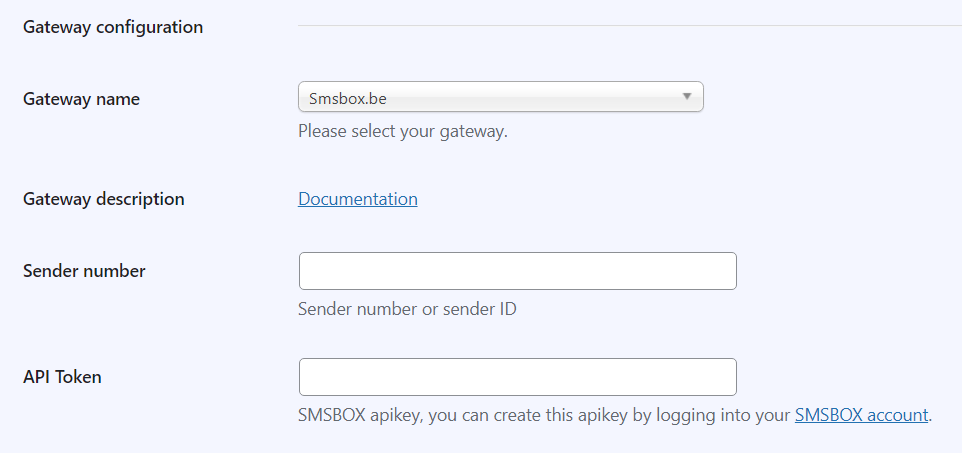
Go to the WP-SMS settings and select Smsbox.be as gateway.
3
Enter your API key
Copy your personal API key from your SMSBOX dashboard and paste it into the plugin.
Plugin parameters
You configure these parameters via the WP-SMS plugin settings in WordPress.
| Parameter | Description | |
|---|---|---|
| Required | gateway name | Select Smsbox.be from the dropdown list. |
| Required | apikey | Your personal API key — created via your SMSBOX account. |
| Optional | sender number | Your own sender number for foreign destinations. Note: for Belgian destinations a custom sender is not possible. |
Configuration in WordPress
Need help with the installation?
Contact our team — we're happy to help you configure the WordPress SMS plugin.
Contact us WP-SMS pluginFrequently asked questions about the WordPress plugin
The WP-SMS plugin. You install it via your WordPress control panel under Plugins → Add New, select Smsbox.be as the gateway and enter your SMSBOX API key.
Three: install WP-SMS, select SMSBOX as the gateway in the settings and paste your API key. After that you can send SMS from WordPress right away.
Among others order confirmations, customer registrations and contact form submissions. WP-SMS integrates with WooCommerce, Gravity Forms and Contact Form 7.
For foreign destinations you can set your own sender. Please note: for Belgian destinations a custom sender is not possible.
A step-by-step guide is available at wp-sms-pro.com/resources/smsbox-gateway-configuration/. You can also contact us for help.